Mobile casino usability
What your phone can tell you about a casino app’s permissions
A repeatable inspection separates what an app declares, what you allow and what the phone records, with a worked example that makes no claims about a named casino.
What we checked / when
- Record
- Reading note
- Sources checked
- 19 September 2026
- Sources cited
- 5
- Method
- Public pages measured on the bench; no play, no accounts
- Corrections
- Editorial approach and contact
A permission list is not an activity log
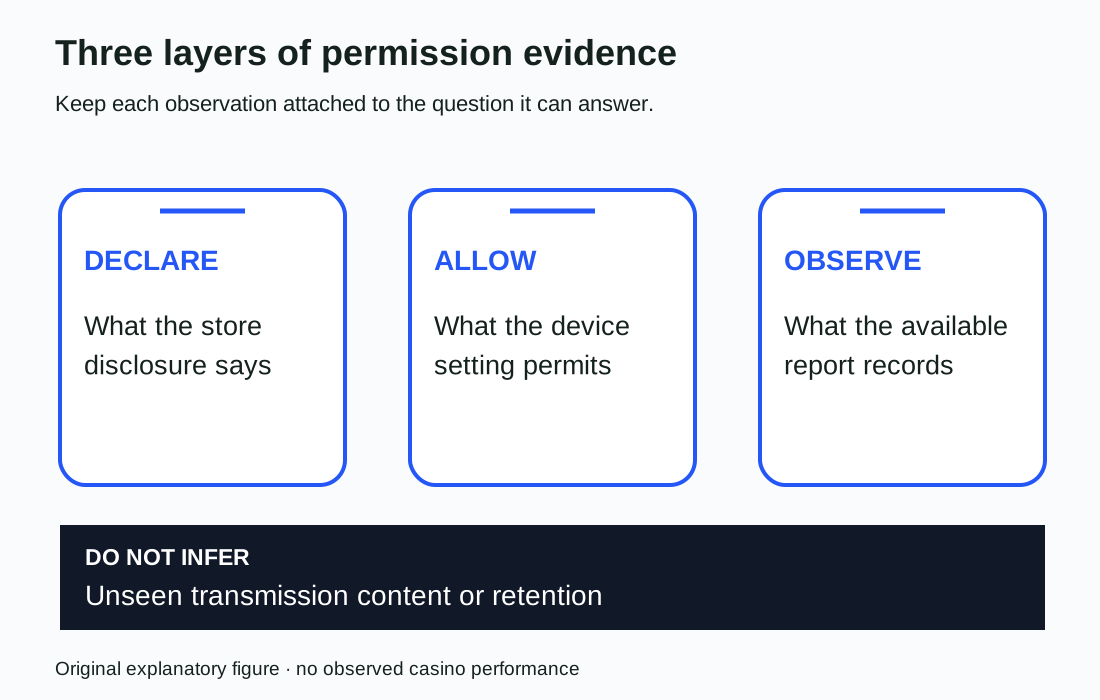
Your phone can answer several questions about a casino app, but the answers come from different places. A store disclosure describes declared data practices. A permission setting tells you what access has been allowed.
An activity report records certain access that occurred within its reporting window. None of those is a complete substitute for the other two.
Start an inspection by giving each layer its own column. If a casino app has camera permission, that does not establish that it used the camera during your visit. If a report shows access, that alone does not establish what was retained by a remote service.
Google’s documentation expressly distinguishes technical permissions from developer-declared Data safety information.
This is a method based on Apple and Google documentation, checked on 19 September 2026. We did not install a casino app, inspect an account or measure a real device. The worked case below is invented and labelled as such.
It shows what a careful observation note would contain, without providing a privacy score.
Sources: Understand app privacy and security practices with Google Play's Data safety section - Android - Google Play Help; About App Privacy Report – Apple Support (UK).
Three layers — declaration, permission, observation
- Store disclosure
- A store disclosure describes declared data practices. Google’s documentation expressly distinguishes technical permissions from developer-declared Data safety information.Understand app privacy and security practices with Google Play's Data safety section - Android - Google Play Help · as checked on
- Permission setting
- A permission setting tells you what access has been allowed. If a casino app has camera permission, that does not establish that it used the camera during your visit.Understand app privacy and security practices with Google Play's Data safety section - Android - Google Play Help · as checked on
- Activity report
- An activity report records certain access that occurred within its reporting window. If a report shows access, that alone does not establish what was retained by a remote service.About App Privacy Report – Apple Support (UK) · as checked on
- Method boundary
- A method based on Apple and Google documentation, checked on 19 September 2026. No casino app was installed, no account inspected and no real device measured; the worked case is invented and labelled as such.About App Privacy Report – Apple Support (UK) · as checked on
None of the three is a complete substitute for the other two. Give each layer its own column before interpreting anything.
Read the store disclosure as a declaration
Apple asks developers to describe their app’s privacy practices, including those of third-party partners whose code they integrate. Developers are responsible for keeping the answers accurate and current. The label is useful documentary evidence, but reading it is not the same as independently tracing the app’s behaviour.
Apple also defines collection for its label in terms of data transmitted off the device and accessible beyond the time needed to service a request in real time. Do not casually replace that defined term with “anything the app touches”. A local operation and a declared collection category can describe different things.
Google similarly explains that its Data safety section is based on developer declarations. Its permissions list is based on technical information. The two may differ because data is processed on the device without being collected, or collected through a route not controlled by a permission.
Record the exact disclosure and platform instead of translating every difference into an accusation of dishonesty.
Sources: App Privacy Details - App Store - Apple Developer; Understand app privacy and security practices with Google Play's Data safety section - Android - Google Play Help.

Inspect Android’s current decision, not a remembered prompt
Google’s Android help describes finding an app in Settings, opening its permissions and changing the relevant permission. It also describes reviewing apps by permission type. Menu details can vary by device and version; the help page flags version limits for some instructions.
Record the device and Android version rather than presenting one tap sequence as universal.
For location, camera and microphone, the available choices may distinguish access while using an app, asking each time or refusing access. Google notes that an all-the-time option applies to location. Copy the actual choice shown for the app you are inspecting.
Do not simplify a conditional setting to a permanent yes.
Before changing anything, decide what your inspection needs to establish. Merely recording a setting can be enough. If you choose to refuse access, note the change and whether the task remains possible, but do not grant new access solely to complete a review.
No inspection requires sharing contacts, photographs or location just to populate a table.
Sources: Change app permissions on your Android phone - Android Help.
Android permission — what to copy into the record
Menu details can vary by device and version, and the help page flags version limits for some instructions. Record what the phone shows, not a remembered prompt.
Ticks are kept only in this browser and are never sent anywhere.
Start the iPhone report before the observation window
Apple’s App Privacy Report is available from iOS 15.2 and iPadOS 15.2. Its documentation explains that collection begins when the report is enabled. An empty report immediately after switching it on is therefore not evidence of an app’s earlier behaviour.
The report includes data and sensor access over the previous seven days, together with network-activity information. Apple says the report is encrypted and stored on the device; turning the report off clears its data. Those boundaries should be recorded before anyone interprets an absence or saves a follow-up observation.
For a repeatable note, record when the report was enabled, the short task undertaken and when the report was read. A note such as “no camera entry in the available observation window” is narrower and more useful than “the app never uses the camera”.
This proposed method does not require keeping the app open, gambling or generating a longer session to make the report look more complete.
Sources: About App Privacy Report – Apple Support (UK).
Method: repeat this on your own phone
The inspection the prose describes, in order. It does not require keeping the app open, gambling or generating a longer session to make a report look more complete.
Give each layer its own column
Declaration, permission and observation answer different questions. A store label, a permission setting and an activity report are recorded separately.
Record the store disclosure and platform
Copy the exact disclosure and the platform it came from. Apple defines collection in terms of data transmitted off the device; Google says Data safety is based on developer declarations.
Copy the current Android permission choice
Note the device and Android version and the actual choice shown for the app. Do not simplify a conditional setting to a permanent yes.
Enable the App Privacy Report before the task
Apple’s documentation explains that collection begins when the report is enabled. Record when the report was enabled, then undertake a short task.
Read the report and record its category
Record when the report was read. For any contacted domain, record the report category as well as the domain; a bare list of addresses loses that distinction.
What the result means
A note such as no camera entry in the available observation window is narrower and more useful than a claim that the app never uses the camera. Nothing in the record establishes what a remote service retained.
Treat a contacted domain as a clue with limits
Apple’s report distinguishes app network activity from website activity within apps. A contacted domain may relate to content inside an app rather than only a direct request from its core code. Apple also excludes private browsing sessions in browser apps from the report’s network activity, while noting a different treatment for private modes in non-browser apps.
Record the report category as well as the domain. A bare list of addresses loses that distinction. Do not publish a claim that personal data was sold, that a named company received an identity document, or that an unfamiliar domain is malicious based only on its appearance in the list.
The next documentary step is to compare the app’s privacy policy and disclosure with the observation, or ask the developer to explain the purpose. This is a boundary on the method, not a finding about any casino. Determining the content of a transmission or a server’s retention practice would require evidence that this worksheet does not collect.
Sources: About App Privacy Report – Apple Support (UK); App Privacy Details - App Store - Apple Developer.
A browser adds a site-level permission record
For Chrome on Android, Google documents site settings for permissions such as location, camera and microphone. It also describes reviewing individual sites and resetting their permissions. The website’s permission is a distinct item to record when comparing browser access with an installed casino app.
Name the browser, its version and the exact website. Keep a native app’s settings on a different row. If you only inspected Chrome’s site setting, write that; do not claim to have checked every permission layer on the phone.
Conversely, seeing a permission assigned to the browser does not identify which casino website requested or used it.
Use the same bounded reading task for both routes if you choose to compare them. For example, locate the privacy policy and identify the contact route without signing in. Record where a permission request interrupted that task, if one actually occurred.
We have not performed that comparison here and cannot infer that an app or a website is safer from its format alone.
Sources: Change site settings permissions - Android - Google Chrome Help.

Work through a synthetic camera-access record
Suppose an invented casino app’s store disclosure describes a data practice, Android shows camera access allowed only while the app is in use, and a supported device report later records camera access during a chosen task. The three records concern declaration, permission and observation. They should not be collapsed into one field called “camera data collected”.
The table shows the conclusion each item permits. Nothing in this example proves that a photograph left the phone or was retained on a server. Equally, refusing camera permission would not by itself prove that the service collects no other information.
Those would be additional questions, requiring different evidence.
Add the task and time window to every actual record. “Opened help at 10:00” and “uploaded an identity photograph at 10:00” describe materially different observations. These times are illustrative labels, not test timestamps.
There is no reason to upload a document for this inspection; if a task asks for one, record the boundary and stop.
| Layer | Illustrative observation | Permitted conclusion |
|---|---|---|
| Declaration | Store label describes a data practice | The developer declared that practice |
| Permission | Camera allowed while app is in use | That conditional access is permitted |
| Observation | Report records camera access in the window | Camera access was recorded in that window |
| Unobserved transfer | No transmission-content evidence collected | Remote collection or retention remains unknown |
| Task boundary | Document upload not performed | No claim about the upload workflow |
Sources: Understand app privacy and security practices with Google Play's Data safety section - Android - Google Play Help; Change app permissions on your Android phone - Android Help; About App Privacy Report – Apple Support (UK).
Terms used on this bench
- Data safety section
- Google Play’s developer-declared description of collection, sharing and handling; separate from the technical permissions list.
- App Privacy Report
- Apple’s on-device record of certain data and sensor access and network activity, gathered only after it is enabled.
- Collection, as Apple’s label defines it
- Data transmitted off the device and accessible beyond the time needed to service a request in real time.
- Site setting
- A browser’s own permission record for one website, such as location, camera or microphone in Chrome on Android.
- Observation window
- The period between enabling a report and reading it; only access recorded inside it can be interpreted.
- Conditional permission
- An access choice that applies only while an app is in use, or asks each time, rather than a permanent yes.
Publish an observation note that someone can repeat
A useful inspection note identifies the app or domain, device, operating system, app or browser version, task, permission state and reporting window. Give the observation its own wording before adding any interpretation. Mark a screen that could not be reached as uninspected rather than assigning it a failing privacy score.
The result might be a practical usability finding: the explanation for a permission request was hard to find, the refusal route interrupted a nonessential task, or the settings could not be located using the published help. Each finding still requires an actual observation. None is asserted about a real casino by this article.
Keep personal information out of shared notes and retain only the evidence needed to explain the issue. A device log can expose unrelated browsing or app activity, so a whole-phone report is not necessary for a single permission question. This worksheet supports careful inspection; it does not certify security, licensing or freedom from gambling harm.
Sources: Change app permissions on your Android phone - Android Help; About App Privacy Report – Apple Support (UK); Change site settings permissions - Android - Google Chrome Help.
Observation note — fields to include
A whole-phone report is not necessary for a single permission question; a device log can expose unrelated browsing or app activity.
Ticks are kept only in this browser and are never sent anywhere.
Questions answered
Is it safer to use an app or a website on your phone?
Format alone does not establish safety. Compare the specific service and evidence; permissions and privacy disclosures answer narrower questions than a full security or licensing assessment.
What is the difference between the permissions list and the Data safety section of an app?
Google says the permissions list is based on technical information about access, while Data safety is based on developers’ declarations about collection, sharing and handling. A difference needs interpretation, not an automatic breach verdict.
What is App Privacy Report?
Apple’s report shows certain data and sensor access and network activity after it is enabled. Its documented seven-day records have limits and do not amount to a complete audit of remote data use.
Can I change an app’s permissions after allowing them?
Android’s settings allow permissions to be reviewed and changed for an app or permission type. Follow the device’s current options and note version differences; the change itself is not evidence about past access.
Does an empty report mean the casino app accessed nothing?
No. Check whether reporting was enabled and what the report covers. State only what was absent from the available observation window, rather than a claim about all past activity.
Why is the worked example invented?
No casino app was installed, no account inspected and no real device measured for this article. The worked case shows what a careful observation note would contain, without providing a privacy score.
Do I need to upload a document to complete the inspection?
No. There is no reason to upload a document for this inspection; if a task asks for one, record the boundary and stop.
Accessibility sources
- Understand app privacy and security practices with Google Play's Data safety section - Android - Google Play Help
- About App Privacy Report – Apple Support (UK)
- App Privacy Details - App Store - Apple Developer
- Change app permissions on your Android phone - Android Help
- Change site settings permissions - Android - Google Chrome Help