
Mobile casino usability
Can you reach casino account controls with one hand?
A repeatable inspection method for reach, grip changes and unintended touches, with WCAG checks kept separate from personal comfort.
What we checked / when
- Record
- Reading note
- Sources checked
- 19 September 2026
- Sources cited
- 6
- Method
- Public pages measured on the bench; no play, no accounts
- Corrections
- Editorial approach and contact
A large button can still be out of reach
One-handed reachability is a question about a person, a phone and a route through the interface. A button can have a generous active area and still require that person to shift their grip to reach it. Conversely, a comfortably placed icon can have a small or crowded target.
Record those observations separately instead of turning them into one usability score.
W3C's minimum target-size criterion is an AA requirement with a 24 by 24 CSS-pixel size rule and specified exceptions, including spacing. Its enhanced criterion uses 44 by 44 CSS pixels at AAA, again with exceptions. Neither number, on its own, is a measurement of how far a particular thumb can reach.
This article supplies an inspection protocol, not results from casino apps or participants. No named operator was tested, no tap count was measured and no population comfort zone was estimated. The original comparison later in the article uses invented interface observations to show how the record works.
Its purpose is to help a future reviewer produce a bounded result that another person can understand and repeat.
Sources: Understanding SC 2.5.8: Target Size (Minimum); Understanding SC 2.5.5: Target Size (Enhanced).
Thresholds before results — the six criteria cited
- Target size (minimum)
- An AA requirement with a 24 by 24 CSS-pixel size rule and specified exceptions, including spacing.Understanding SC 2.5.8: Target Size (Minimum) · as checked on
- Target size (enhanced)
- 44 by 44 CSS pixels at AAA, again with exceptions. A different level, not an alternative way to report the AA threshold.Understanding SC 2.5.5: Target Size (Enhanced) · as checked on
- Dragging movements
- Functionality available through a single pointer without dragging, unless dragging is essential or the stated user-agent exception applies.Understanding SC 2.5.7: Dragging Movements · as checked on
- Pointer cancellation
- A Level A criterion permitting several routes: not executing the function on the down-event, suitable abort or undo behaviour, up-event reversal, or an essential exception.Understanding SC 2.5.2: Pointer Cancellation · as checked on
- Orientation
- Addresses restricting content to one display orientation unless that orientation is essential.Understanding SC 1.3.4: Orientation · as checked on
- Focus not obscured (minimum)
- Concerns a focused component being entirely hidden by author-created content; not a general rule that every part of every screen stays visible at once.Understanding SC 2.4.11: Focus Not Obscured (Minimum) · as checked on
Protocol only: no named operator was tested, no tap count was measured and no population comfort zone was estimated. The later comparison uses invented interface observations.

Choose an account task with a clear stopping point
Choose one non-transactional task, such as opening account history, reading the help page or finding the page that explains a deposit control. Write down the starting screen and the precise information you want to reach. Stop before changing a live limit, submitting personal details, depositing or placing a bet.
A route inspection does not require a financial transaction.
For a limit-related route, separate finding the explanation from changing the setting. The first is a navigation observation; the second changes an account. If login is required and you do not have authorised access, record that boundary rather than completing the sheet from assumptions.
An inaccessible stage is not automatically a failed accessibility criterion.
Keep the objective stable across repeats. Opening a help menu on one run and successfully saving an account setting on another would produce misleading tap comparisons. Record whether an overlay, cookie notice or remembered login altered the starting point.
These details are proposed controls for the method, not observations about a specific casino. They make clear which differences belong to the route and which belong to the setup.
Method — repeat this on your own phone
A route inspection does not require a financial transaction. Stop before changing a live limit, submitting personal details, depositing or placing a bet.
Choose one non-transactional task
Pick a task such as opening account history or reading the help page. Write down the starting screen and the precise information you want to reach.
Record the setup and the grip
Note the device model, operating system, browser or app version, display settings and orientation. Record which hand you used and whether the phone rested on a surface or was held unsupported.
Mark every touch on the route
Mark each deliberate touch, each missed activation, each grip change and each use of the other hand. Define these before starting.
Measure the active area only if you can
If the setup gives reliable access to the active region, record its dimensions in CSS pixels and note the method. Otherwise mark the geometry unmeasured.
Check the alternative to dragging
Look for an equivalent tap-based route or another control that achieves the same function. Record what exists and whether you actually used it.
Check cancellation and orientation separately
Record the behaviour of a harmless navigation control, and the device's orientation-lock setting, before attributing anything to the site.
What the result means
One route was inspected on the stated device, starting screen and grip, and required the recorded changes; geometry or alternatives not checked are named as such. That is narrower and more reproducible than calling the casino app accessible.
Make the grip part of the observation
Record the device model, operating system, browser or app version, display settings and orientation. For a personal inspection, record which hand you used and whether the phone rested on a surface or was held unsupported. You do not need to publish personal biometric measurements to explain these conditions.
The goal is a reproducible description of the setup.
During the route, mark each deliberate touch, each missed activation, each grip change and each use of the other hand. Define these before starting. Here, a grip change means repositioning the phone in the holding hand to continue; a second-hand action means introducing the other hand to stabilise or operate it.
Those are working definitions for this protocol, not WCAG terminology.
Do not treat an adaptation as a personal failure. A person may prefer two-handed use, use a mount or operate the phone through another input method. Record what the interface required under the chosen setup.
A single-person result should be reported as that person's observation, not a claim about all small hands, all disabled users or every owner of the same phone.
Working definitions for this protocol
- Grip change
- Repositioning the phone in the holding hand to continue the route. A working definition for this protocol, not WCAG terminology.
- Second-hand action
- Introducing the other hand to stabilise or operate the phone during the route.
- Missed activation
- A deliberate touch that did not activate the intended control, recorded as its own event.
- Active area
- The region that actually responds to a touch, which is not necessarily the whole visible icon.
| Field | What to record | Observation |
|---|---|---|
| Setup | Device, software, settings and orientation | Not recorded |
| Task | Start screen, target information, stopping point | Not recorded |
| Grip | Hand, support and starting position | Not recorded |
| Route | Each touch, missed activation and grip change | Not observed |
| Geometry | Active area, CSS unit and measurement method | Not measured |
| Alternative | Equivalent input route and what was verified | Not inspected |
| Limit | Login, transaction or other untested boundary | Not recorded |
Measure the active area only when you can establish it
The visual icon is not necessarily the whole active target. If the inspection setup provides reliable access to the active region, record its dimensions in CSS pixels and note the method. If all you have is a screenshot, do not convert an apparent screen width into an exact CSS measurement without establishing the relationship.
Mark the geometry unmeasured instead.
For the minimum target criterion, size is not the only route to meeting the requirement: its exceptions need examination. A small control with suitable spacing cannot be declared a failure simply because its width is below 24 CSS pixels. Likewise, a target that meets the size rule does not establish complete accessibility of the page or task.
The enhanced criterion is a different level, not an alternative way to report the AA threshold. Keep both labels if you discuss both. This distinction is useful in an account menu where the same reviewer is making two observations: a geometric check against a published criterion and a personal note about reaching the control.
They can point in different directions without either record being dishonest.
Sources: Understanding SC 2.5.8: Target Size (Minimum); Understanding SC 2.5.5: Target Size (Enhanced).

Check the alternative to dragging
Account controls sometimes use interactions that require movement while contact is maintained. For the web criterion on dragging movements, W3C describes making the functionality available through a single pointer without dragging, unless dragging is essential or the functionality falls under the stated user-agent exception. A keyboard alternative by itself does not answer that pointer-specific question.
In this protocol, look for an equivalent tap-based route or another control that achieves the same function. A hypothetical slider might also have an editable value field or step buttons. Record what exists and whether you actually used it.
Do not assume that the presence of an icon proves it completes the same task.
For a live account setting, limit the inspection to what can safely be observed without committing a change. If the function cannot be verified without changing the account, record the verification boundary. A future authorised test could use an appropriate test environment.
The absence of such a test here is why this article cannot issue an operator pass or fail. The method distinguishes evidence of an alternative from evidence that it works throughout the task.
Sources: Understanding SC 2.5.7: Dragging Movements.
Dragging — what to record about the alternative
Evidence that an alternative exists is not evidence that it works throughout the task.
Ticks are kept only in this browser and are never sent anywhere.
Cancellation and orientation need separate checks
Pointer cancellation is about preventing or recovering from unintended activation. W3C's Level A criterion permits several routes, including not executing the function on the down-event, suitable abort or undo behaviour, up-event reversal, or an essential exception. It does not say that every control must use one identical gesture.
Record the behaviour of a harmless navigation control before making a narrower finding.
Orientation is another question. W3C's criterion addresses restricting content to one display orientation unless that orientation is essential. Record the device's orientation-lock setting before attributing a restriction to the site.
For one-handed work, changing orientation may change the practical route, but that personal observation remains separate from a criterion assessment.
If a keyboard is part of the setup, examine keyboard focus as its own check. The minimum focus-not-obscured criterion concerns a focused component being entirely hidden by author-created content. It is not a general rule that all parts of every screen must remain visible at once.
A sheet that distinguishes these checks is more informative than a single line saying the page works on mobile.
Sources: Understanding SC 2.5.2: Pointer Cancellation; Understanding SC 1.3.4: Orientation; Understanding SC 2.4.11: Focus Not Obscured (Minimum).
Three separate checks — do not merge them
A sheet that distinguishes these checks is more informative than a single line saying the page works on mobile.
Ticks are kept only in this browser and are never sent anywhere.
Compare synthetic controls without inventing a winner
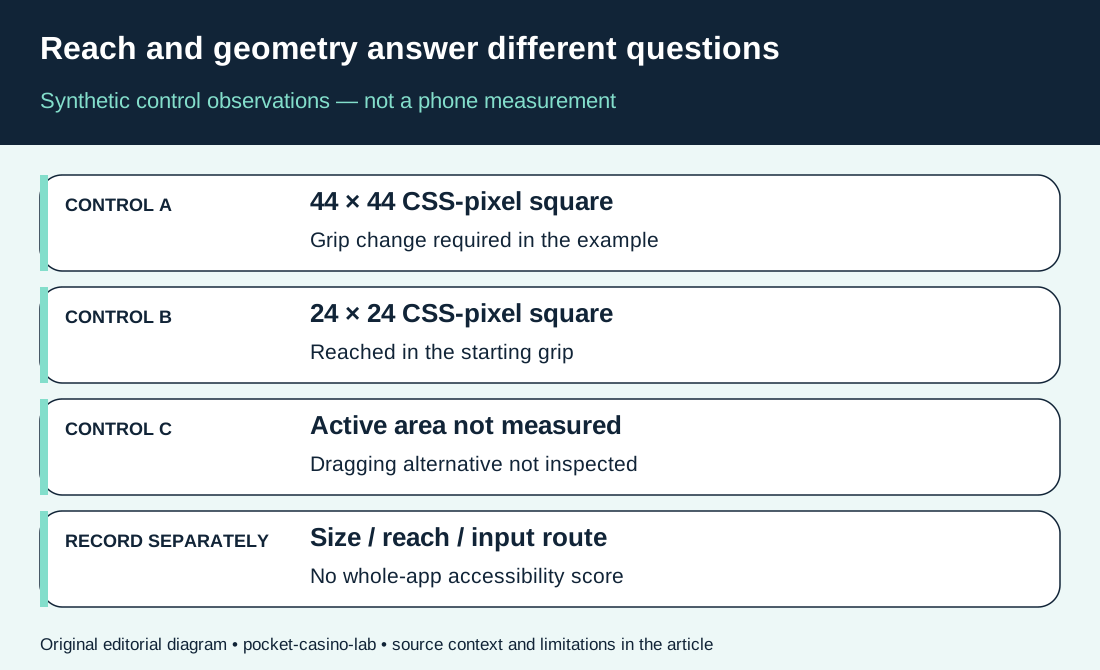
The table uses three hypothetical controls in a fictional account route. Control A has a stated 44 by 44 CSS-pixel active square but requires a grip change. Control B has a 24 by 24 square and can be reached in the starting grip.
Control C has unmeasured geometry and requires a drag; no alternative has been inspected. These are invented teaching inputs, not measurements or screenshots.
The comparison does not rank B as better than A. It says A and B have different recorded reach outcomes while both satisfy the simple square-size condition at their stated thresholds, before considering the rest of the page. Control C needs further inspection.
An unknown value must not be counted as zero or silently converted into a failed standard.
Use the same separation in an actual record: observed fact, measurement method, relevant criterion and unanswered question. If a later inspection finds a second route to Control C, add the evidence and date. Do not rewrite the original observation as though the alternative had already been tested.
The figure visualises these independent columns; its boxes do not represent measured thumb zones or a universal phone layout.
| Control | Illustrative active square | Illustrative route observation | Bounded reading |
|---|---|---|---|
| A | 44 × 44 CSS pixels | Grip change required | Size alone does not establish reach |
| B | 24 × 24 CSS pixels | Reached in starting grip | No whole-page accessibility verdict |
| C | Not measured | Dragging; alternative not inspected | Keep size and alternative unknown |
Report the route, not a whole-app verdict
A useful result might say that one account-history route was inspected on the stated device, with a particular starting screen and grip, and that it required the recorded changes. It should also identify where target geometry or input alternatives were not checked. Such a statement is narrower and more reproducible than calling the casino app accessible.
Repeat the same route under the same conditions if the purpose is to investigate an inconsistent observation. If comparing a different hand or orientation, label it as a separate condition. Do not average incompatible routes together merely to produce a score.
Keep any real results out of this article until the observations exist.
This protocol stops at measurable interaction. Choosing what a deposit limit should be for is a different editorial task, covered by Play in Balance. No universal reach boundary, operator ranking, disability simulation or completed WCAG audit is supplied here.
The blank sheet is ready for an actual inspection; the unfilled fields are the honest starting point.
Questions answered
Can a small casino icon have an adequate tap target?
Yes. The active area can extend beyond the visible icon. Establish the real target and applicable exceptions before reaching a criterion finding.
Does a 44-pixel button prove one-handed usability?
No. CSS target size does not establish whether a particular person can reach it in the recorded grip or complete the full route.
Does a keyboard alternative satisfy the dragging criterion?
Not by itself. The dragging criterion asks about an equivalent single-pointer route without dragging, subject to its exceptions.
Which is better, a mobile app or a web app?
This protocol cannot rank them. It records a specific task and setup, and its web-criterion references are not a completed native-app assessment.
Should a grip change be recorded as a WCAG failure?
No. A grip change is an observation under this protocol. A standards finding needs evidence against the relevant criterion and its exceptions.