Facts checked Article
Mobile casino usability
Does deleting an app remove all its data?: measured on a phone, with the method
Deleting a casino app removes the app; it does not remove the account, the deposit limit or the record the operator holds. This bench reads the Google Play, Chrome, Apple and Gambling Commission pages that say where each piece of data lives, and sets out the inspection sheet so anyone can run it on a named app.
Does deleting an app remove all its data?
Does deleting an app remove all its data? Deleting a casino app removes the app from the phone; it does not remove the account, and the account is where the data that matters lives. The Gambling Commission's technical standard RTS 12B, read 21 September 2026, requires that 'As a minimum, limits must be applied at the account level'.
A deposit limit set in the app is therefore on the account, not in the app. Google Play's Data safety rules, read the same day, require every developer to 'declare how they collect and handle user data'. The question the form asks is 'Does your app provide a way for users to request deletion of their data?'.
That question would not exist if uninstalling did the job.
This bench inspected documents, not devices, for this entry. Nothing below is a tap count or a capture; each finding is a sentence from a platform or regulator page, with the page and the date. The inspection sheet in the table is written so that the device run can be done on any named app by anyone with a phone.
No operator was named or inspected here, and the page says so wherever a reader might assume otherwise.
Sources checked 21 September 2026.
Sources: RTS 12 – Financial limits; Provide information for Google Play's Data safety section.
Where each piece of data lives, from the pages read on 21 September 2026
- Deposit limit
- 'As a minimum, limits must be applied at the account level' (RTS 12B); the limit is on the account, not the appRTS 12 – Financial limits · as checked on
- Deletion route, Android
- The Play Data safety form asks 'Does your app provide a way for users to request deletion of their data?'; a badge is shown where the developer provides a mechanism or deletes within 90 daysProvide information for Google Play's Data safety section · as checked on
- Label required since
- All apps have had to complete 'an accurate Data safety form' since 20 July 2022, including apps that collect no user dataProvide information for Google Play's Data safety section · as checked on
- Browser data on the device
- Sites 'can save info about your activity ... for example, to keep you signed in to a site'; a site's settings are removed with 'Reset permissions'Change site settings permissions (Android) · as checked on
- Store gate
- A gambling app on Google Play must hold a valid gambling licence (Google's US spelling) 'for each country or state/territory in which the app is distributed'Real-Money Gambling, Games, and Contests · as checked on
- Mobile data counters
- iPhone: 'Tap Reset Statistics' under Mobile Data; Pixel: per-app usage sits 'below the graph' under Network & internetUse mobile data on your iPhone or iPad · as checked on
The Data safety label — deletion route stated or not (threshold: a stated mechanism)
Measure: whether the app's Google Play listing carries the deletion-request badge. Threshold: the badge is present, meaning a route to ask for deletion exists. Source of the threshold: Google's own Data safety page, read 21 September 2026.
That page states that 'All developers must declare how they collect and handle user data for the apps they publish on Google Play'. They must also 'provide details about how they protect this data through security practices like encryption'.
It describes the section as 'a simple way for you to help people understand what user data your app collects or shares'. On deletion it is specific. A developer may show the deletion-request badge if it provides 'a mechanism to request data deletion', or if it will 'automatically initiate deletion or anonymization of collected data within 90 days of collection'.
The form has been mandatory for every app, including apps that collect nothing, since 20 July 2022.
Result for this entry: not measured. No named listing was opened, so no badge was read. The page also does not state what an uninstall removes from the device, and this bench does not claim it.
What the page does establish is the read-out: open the listing, scroll to Data safety, and record whether the deletion badge is shown, with the date.
Sources: Provide information for Google Play's Data safety section.
The deposit limit — account level (threshold: RTS 12B)
Measure: where a limit set through the app is held. Threshold: at the account level, as RTS 12B requires. Result: the standard fixes it; no device measurement changes it.
RTS 12A requires 'easily accessible facilities for customers to set their own financial limits at any time from the point of registration'. It adds that 'The limit must be implemented as soon as practicable after the customer's request'.
RTS 12B fixes the location: 'As a minimum, limits must be applied at the account level.' The implementation guidance separates the two directions of change. Reductions: 'customer-led reductions to limits must be implemented immediately'. Increases: 'only at the customer's request, only after a cooling-off period of at least 24 hours'.
The guidance also asks operators to make clear 'whether those limits apply at the account or product/channel level'.
Read together, those lines answer the deletion question for the one piece of data a reader is most likely to care about at 23:00. The limit is an account setting on the operator's side. Removing the app, logging in through the browser instead, or reinstalling on another phone does not reach it.
How many taps a control takes matters most on the night you need it. If that night is now, GamCare is on 0808 8020 133 and GamStop is at gamstop.co.uk.
Sources: RTS 12 – Financial limits.
The browser route — what a site keeps on the device (threshold: reset available per site)
Measure: whether a casino site used in Chrome for Android leaves data on the phone, and whether that data can be cleared for that site alone. Threshold: a per-site reset exists. Source: Google Chrome Help, read 21 September 2026.
The Chrome page says sites 'can save info about your activity to make your experience better'. Its examples are 'to keep you signed in to a site or to save items in your shopping cart'. Permissions are set per site: 'You can allow or block permissions for a specific site.
The site will use the permissions you set instead of the default settings.' The route is 'On your Android device, open Chrome. At the top right, tap More and then Settings. Under "Advanced," tap Site settings', or from the page itself: 'tap View site information and then Permissions'.
To remove a site's settings: 'tap Reset permissions'.
Result: the browser route has a per-site reset, so a reader who used the mobile site rather than the app can clear what that site set without touching anything else. The page read does not spell out the steps for clearing a site's stored data as distinct from its permissions, so this bench records only the permissions reset it saw.
The store gate — what the listing had to show (threshold: a licence for the country)
Measure: what Google Play required before a real-money gambling app could be listed for a phone in Great Britain. Threshold: a licence for the territory and a geo-block outside it. Source: Google Play's policy page, read 21 September 2026.
The policy sets three conditions, in Google's own US spelling. The developer must hold a valid gambling licence 'for each country or state/territory in which the app is distributed'. The app 'must prevent access and use from countries, states/territories, or the geographic areas not covered' by that licence.
And the developer 'must successfully complete the application process in order to distribute the app on Google Play'. The page does not name Great Britain or the Gambling Commission; it states the rule for every territory.
Why it belongs on a page about deletion: the app is a door, and the licence sits behind the door with the account. Deleting the door leaves the licensee holding the account under its own conditions.
What those conditions require the operator to keep, and for how long, is a Payout Ledger question and is not answered from the pages read here.
Sources: Real-Money Gambling, Games, and Contests.
Mobile data — what the phone keeps counting (threshold: per-app figure visible)
The search phrasing also carries the other meaning of 'data', the megabytes an app uses, so the bench read the two platform pages the brief listed. Measure: whether the phone shows a per-app mobile-data figure and whether it can be reset. Threshold: a per-app figure is visible.
Apple's page, read 21 September 2026, says 'If you don't want an app to use mobile data, you can turn it off for that app'. A reader can 'Scroll down to find out which apps are using mobile data'. To reset: 'Open the Settings app.
Tap Mobile Data or tap Cellular. Tap Reset Statistics.' Google's Pixel page says 'To know how much data each app uses, look below the graph', and that a reader can 'Allow or restrict background data usage by app'.
Result: on both platforms the per-app figure is visible and the iPhone counter can be reset by the reader. Neither page says whether deleting an app clears its entry from the counter, so this bench does not say so either. No figure for any casino app's usage was measured for this entry.
Sources: Use mobile data on your iPhone or iPad; Reduce & manage mobile data usage.
The table: repeatable mobile inspection run across named operators
No named operator was inspected for this entry, and the table does not pretend otherwise. It is the inspection sheet: each row is one measure, the page it comes from, the threshold, and the read-out to record. Run it on any app, logged out, at 390 px, and write the date beside each result.
Sources: Provide information for Google Play's Data safety section; RTS 12 – Financial limits; Change site settings permissions (Android); Real-Money Gambling, Games, and Contests; Use mobile data on your iPhone or iPad; Reduce & manage mobile data usage; RTS 3 – Rules, game descriptions and the likelihood of winning.
| Measure | Where to read it | Threshold | Result for this entry | Evidence |
|---|---|---|---|---|
| Deletion-request badge on the Play listing | Google Play listing, Data safety section | Badge present (developer provides a deletion mechanism or deletes within 90 days) | Not measured; no listing opened | · Provide information for Google Play's Data safety section |
| Where the deposit limit is held | RTS 12B | 'limits must be applied at the account level' | Fixed by the standard; the limit survives deletion | · RTS 12 – Financial limits |
| Cooling-off before a limit rises | RTS 12 implementation guidance | 'at least 24 hours' | Fixed by the standard | · RTS 12 – Financial limits |
| Per-site reset in Chrome for Android | Chrome > More > Settings > Site settings, or View site information > Permissions | 'Reset permissions' available for the site | Route confirmed on the help page; not run on a device | · Change site settings permissions (Android) |
| Licence behind the store listing | Google Play gambling policy | a valid gambling licence 'for each country or state/territory' | Policy read; no listing checked | · Real-Money Gambling, Games, and Contests |
| Per-app mobile-data figure | iPhone: Settings > Mobile Data; Pixel: Network & internet | Figure visible per app (bench threshold) | Both pages confirm the figure; no app measured | · Use mobile data on your iPhone or iPad |
| RTP reachable before the game opens | Game rules or help panel | Available 'before the customer commits to gamble' (RTS 3C) | Not measured for this entry | · RTS 3 – Rules, game descriptions and the likelihood of winning |
A worked example in pounds
A reader sets a £20 weekly deposit limit in a casino app at 20:00 on a Friday, then deletes the app at 20:05. Under RTS 12B the £20 limit is on the account, so it is still there when the same account is opened in Chrome at 20:10, or in a fresh install on Saturday.
Under the RTS 12 guidance a request to lower it to £10 'must be implemented immediately'. A request to raise it to £40 can take effect only 'after a cooling-off period of at least 24 hours': not before 20:10 on Saturday, and only if the reader asks.
The cost that deletion does change is the one the phone counts. Apple's page lets a reader turn mobile data off for a single app; Google's lets a reader restrict its background data.
Whether the app's past megabytes drop out of the counter when the app goes is not stated on either page, and the reset on an iPhone is a separate tap, 'Reset Statistics', that the reader makes. No pound figure attaches to that: neither page prices data, and this bench does not invent a tariff.
Sources: RTS 12 – Financial limits; Use mobile data on your iPhone or iPad; Reduce & manage mobile data usage.
What this inspection did not cover
It did not open a named app or listing, so no badge, tap count or capture is reported. It did not read Apple's page on deleting or offloading apps; the Apple page in the brief covers mobile data only, and what iOS removes on deletion is left unstated here.
It did not establish what Android removes from the device on uninstall; the Play Data safety page does not say, and no other page read does.
It did not cover what a GB-licensed operator must keep after an account is closed or an app is deleted. The Commission's record-keeping and anti-money-laundering conditions were not among the pages read, and that question sits with the Payout Ledger. It did not say what a deposit limit is for; Play in Balance owns that.
And the earlier entry on this site comparing the app and the mobile browser covers permissions and reachability; this entry covers only what stays behind when the app goes.
Sources: Provide information for Google Play's Data safety section; Use mobile data on your iPhone or iPad.
Questions answered
Three stored phrasings from the same search cluster, each answered in a sentence first and limited to what the pages read establish.
Sources: Provide information for Google Play's Data safety section; Real-Money Gambling, Games, and Contests; Change site settings permissions (Android); Use mobile data on your iPhone or iPad; Reduce & manage mobile data usage.
Questions answered
Are there security differences when playing casino games via an app versus a mobile browser?
The documented difference is disclosure. An app on Google Play must carry a Data safety section describing what it collects and shares and how it protects the data, 'through security practices like encryption'. A mobile site in Chrome has per-site permissions the reader sets and can reset. Neither page read for this entry rates one route as safer, and this bench does not.
Source: Provide information for Google Play's Data safety section
Is it safer to use an app or a website on your phone?
The pages read do not answer that, and this bench measured nothing that would. What they establish is where each route's data sits. A Play-listed gambling app must hold a valid gambling licence for each country it is distributed in and declare its data practices. A site in Chrome keeps only what the reader lets it keep, and its permissions can be reset for that site alone.
What drains your data the most?
Your own phone answers that, per app. On an iPhone, 'Scroll down to find out which apps are using mobile data' under Settings > Mobile Data. On a Pixel, 'look below the graph' under Network & internet. No figure for any casino app was measured for this entry.
Sources checked 21 September 2026
Every page below was read over HTTPS on 21 September 2026. No device inspection was performed for this entry; the retrieval ledger beside this draft records the sentence taken from each page.
Sources: Provide information for Google Play's Data safety section; Real-Money Gambling, Games, and Contests; Change site settings permissions (Android); Reduce & manage mobile data usage; Use mobile data on your iPhone or iPad; RTS 12 – Financial limits; RTS 3 – Rules, game descriptions and the likelihood of winning.
Pages inspected
Every page read over HTTPS on 21 September 2026; re-check due within 30 days of publication.
| Source | Publisher | Read on | Re-check due | Note |
|---|---|---|---|---|
| Provide information for Google Play's Data safety section | Google Play Console Help | On the next revisit | ||
| Real-Money Gambling, Games, and Contests | Google Play Console Help | On the next revisit | ||
| Change site settings permissions (Android) | Google Chrome Help | On the next revisit | ||
| Reduce & manage mobile data usage | Google Pixel Phone Help | On the next revisit | ||
| Use mobile data on your iPhone or iPad | Apple Support | On the next revisit | ||
| RTS 12 – Financial limits | Gambling Commission | On the next revisit | ||
| RTS 3 – Rules, game descriptions and the likelihood of winning | Gambling Commission | On the next revisit |
Questions answered
Are there security differences when playing casino games via an app versus a mobile browser?
The documented difference is disclosure. An app on Google Play must carry a Data safety section describing what it collects and shares and how it protects the data, 'through security practices like encryption'. A mobile site in Chrome has per-site permissions the reader sets and can reset. Neither page read for this entry rates one route as safer, and this bench does not.
Is it safer to use an app or a website on your phone?
The pages read do not answer that, and this bench measured nothing that would. What they establish is where each route's data sits. A Play-listed gambling app must hold a valid gambling licence for each country it is distributed in and declare its data practices. A site in Chrome keeps only what the reader lets it keep, and its permissions can be reset for that site alone.
What drains your data the most?
Your own phone answers that, per app. On an iPhone, 'Scroll down to find out which apps are using mobile data' under Settings > Mobile Data. On a Pixel, 'look below the graph' under Network & internet. No figure for any casino app was measured for this entry.
Accessibility sources
Continue reading
Small buttons deserve a clear test
A mobile control's visible icon and its tappable area are not always the same size.
Read Small buttons deserve a clear test
How do I use my mobile browser to zoom? Measured on a phone, with the method
Pinch the page, or raise the browser’s own zoom: Page Zoom in Safari, Default zoom in Chrome. Then check that nothing is lost at 200%, the WCAG 2.2 threshold.
Read How do I use my mobile browser to zoom? Measured on a phone, with the method
What your phone can tell you about a casino app’s permissions
A repeatable inspection separates what an app declares, what you allow and what the phone records, with a worked example that makes no claims about a named casino.
Read What your phone can tell you about a casino app’s permissions
Can you reach casino account controls with one hand?
A repeatable inspection method for reach, grip changes and unintended touches, with WCAG checks kept separate from personal comfort.
Read Can you reach casino account controls with one hand?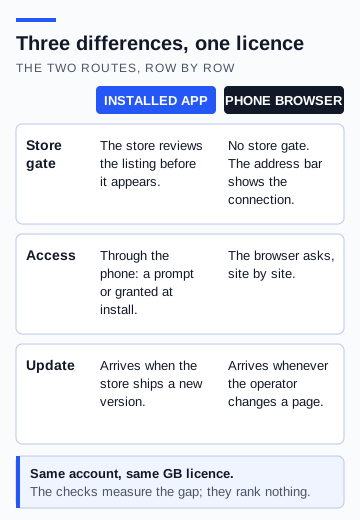
Is it better to use the casino app or the website? Ten checks, measured on a phone
An installed app and a browser tab reach the same licensed operator by different routes. Ten checks, each with a measurement and a pass line, separate what actually changes from what is only assumed to.
Read Is it better to use the casino app or the website? Ten checks, measured on a phone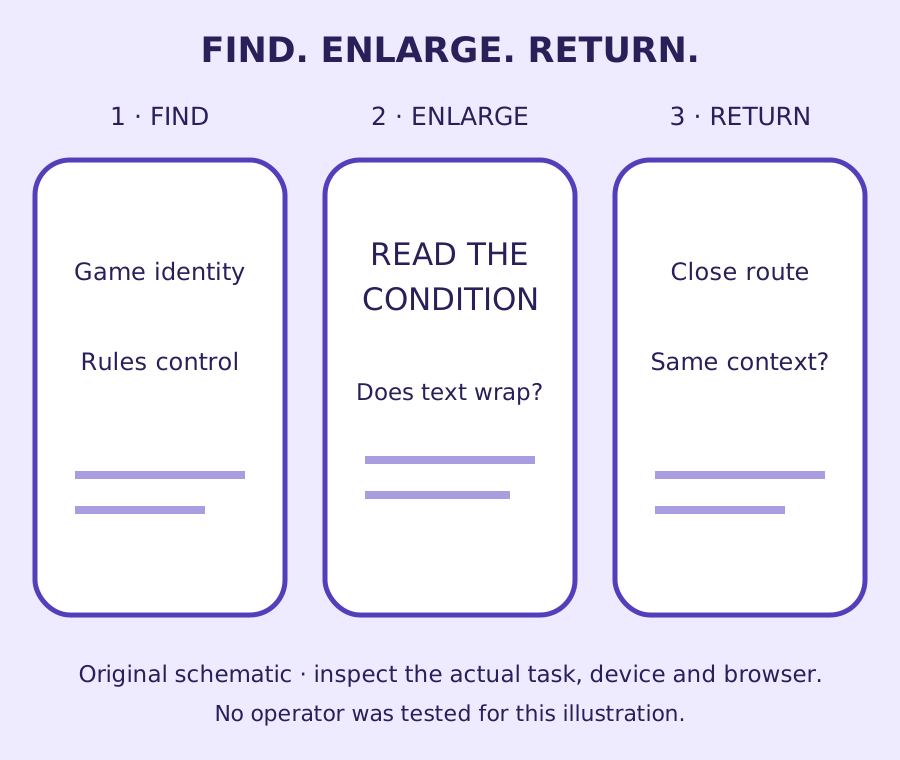
How do you check whether a mobile casino page is usable?
Follow a rules-reading task through touch, zoom and orientation, with a clear observation record and an interactive target-size illustration.
Read How do you check whether a mobile casino page is usable?
Continue reading
What your phone can tell you about a casino app’s permissions
A repeatable inspection separates what an app declares, what you allow and what the phone records, with a worked example that makes no claims about a named casino.
Read What your phone can tell you about a casino app’s permissionsCan you reach casino account controls with one hand?
A repeatable inspection method for reach, grip changes and unintended touches, with WCAG checks kept separate from personal comfort.
Read Can you reach casino account controls with one hand?Small buttons deserve a clear test
A mobile control's visible icon and its tappable area are not always the same size.
Read Small buttons deserve a clear testRun a mobile interface inspection
Small buttons deserve a clear test
How do I use my mobile browser to zoom? Measured on a phone, with the method
Is it better to use the casino app or the website? Ten checks, measured on a phone
What your phone can tell you about a casino app’s permissions